
Car renewal in Dubai is two jobs, not one. The first is the RTA inspection, which means getting the car to an approved centre and back. The second is the renewal itself, which is entirely online and takes about five minutes once the inspection is behind you.
This guide covers the second job. Every screenshot below is the actual RTA portal, from opening the service to downloading your new registration card.
What You Need Before You Start
- A passed RTA inspection, unless you bought the car new from a local authorised dealer and it is still inside its first three years
- Active car insurance, valid for at least six months including the registration grace period
- Your vehicle's plate category, plate code and plate number
- Your Traffic File Number
- A mobile number registered with RTA, to receive the OTP
- A card for payment, covering the renewal fees plus any outstanding fines
The first two are the ones that stop people. The portal checks both against your plate and will not let you past the confirmation screen without them, so it is worth confirming the inspection is done before you open the form at all.
Where to Get the RTA Inspection Done First
Inspection has to happen before the renewal, and it is the only part of the process that still costs you a trip. Any RTA-approved centre works, whether that is Tasjeel, Wasel, Shamil or one of the smaller networks, and our Tasjeel and RTA testing center locations guide lists the branches by area with their hours.
The exemption catches people out. RTA’s own renewal service page puts it plainly: a private vehicle bought from a local authorised dealer can be registered and renewed for three years without a technical inspection, but any change of ownership requires an inspection even inside those three years. A two-year-old car you bought secondhand still needs testing.
If you want to know what the technicians actually look at before you go, the RTA testing checklist and pass tips covers brakes, tyres, lights and emissions, and the faults that send most cars back for a retest.
Once the car has passed, the certificate is filed against your plate automatically. You do not upload anything. The portal reads it.
Start Your Car Renewal in Dubai
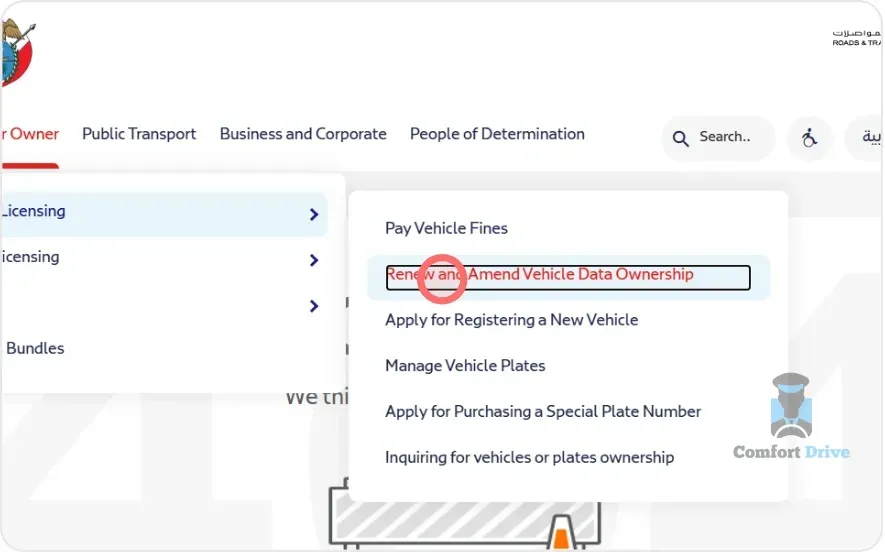
Step 1: Open the Right RTA Service
From the RTA website menu, go to Licensing and select “Renew and Amend Vehicle Data Ownership.”
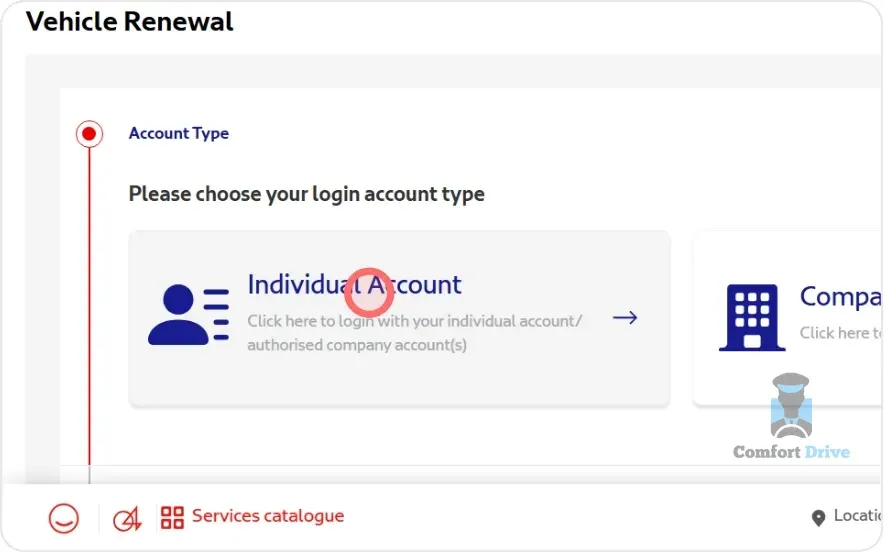
Step 2: Choose Your Account Type
Select Individual Account if you are renewing a car registered in your own name. Company vehicles use the corporate route instead.
The screen that follows offers two ways in, a Driving Licence tab and a Number Plate tab. The plate route is the quicker one, and it helps to have your Emirates ID expiry date within reach.
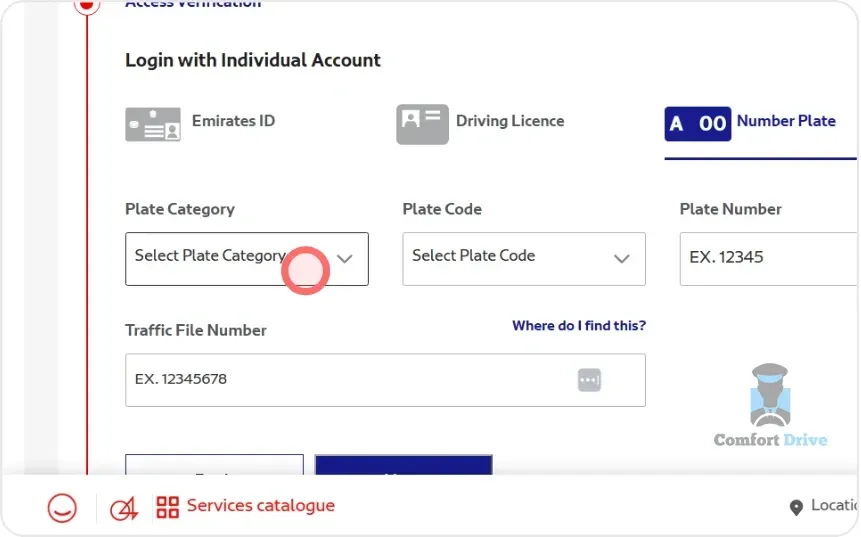
Enter Your Plate Details and Traffic File Number
Step 3: Fill In the Plate Form
Four fields, all of which have to match what RTA holds: Plate Category, Plate Code, Plate Number and Traffic File Number. Copy them from your current registration card rather than from memory.
The Traffic File Number is the one people go hunting for. It is the number RTA uses to group every vehicle and violation under your name, and it appears on both your registration card and your Dubai driving licence.
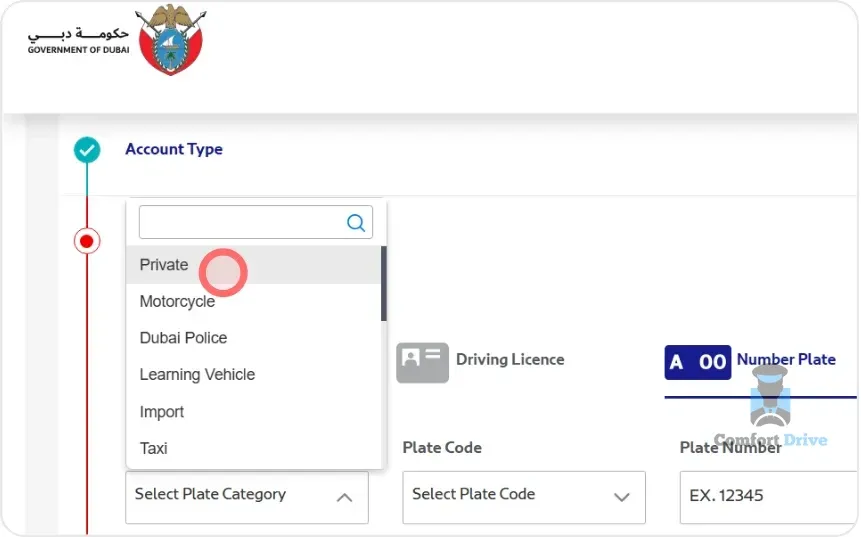
Step 4: Set the Category and Code from the Dropdowns
Plate Category and Plate Code are dropdowns rather than free text. Choose the category that matches your vehicle, which for most private cars is Private, then pick the code letter printed on your plate. Type the plate number, add the Traffic File Number, and click Next.
Verify Your Identity With the RTA Code
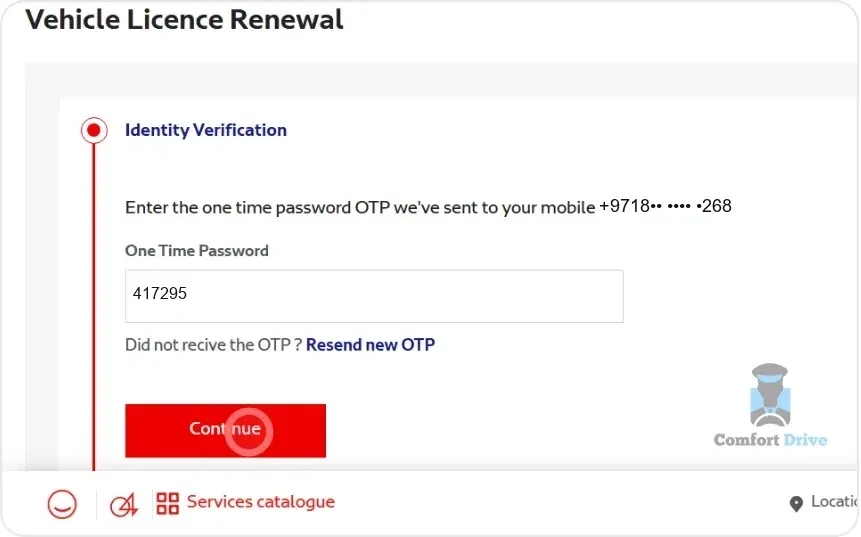
Step 5: Enter the One-Time Code
Enter the mobile number registered with RTA, click Continue, then type the OTP it sends you. A number you changed and never updated with RTA will not receive the code, and that is the most common place this flow stalls.
Select Your Vehicle
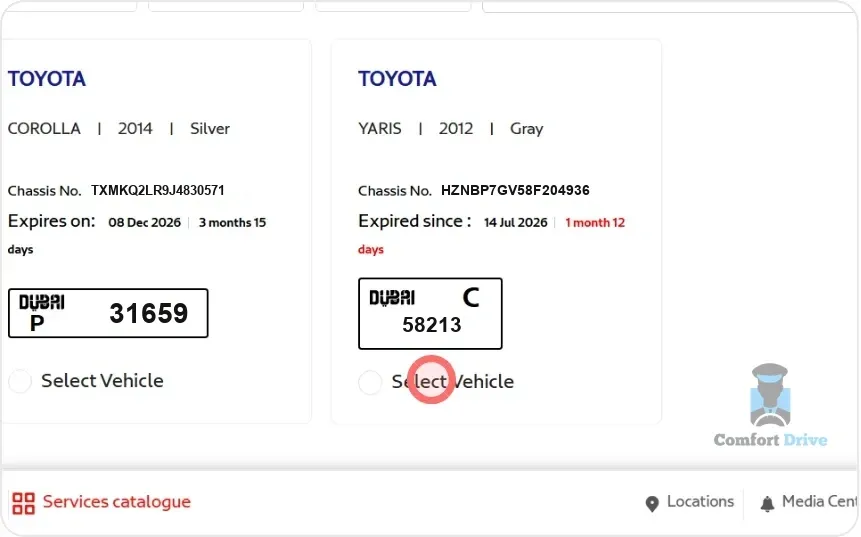
Step 6: Pick the Car You Are Renewing
Every car linked to your account appears here with its chassis number, expiry status and plate. If you run more than one vehicle, the expiry status is the fastest way to spot the right one. Select it and click Continue, using Load More if the car is not on the first screen.
Confirm the Plate, Inspection and Fines
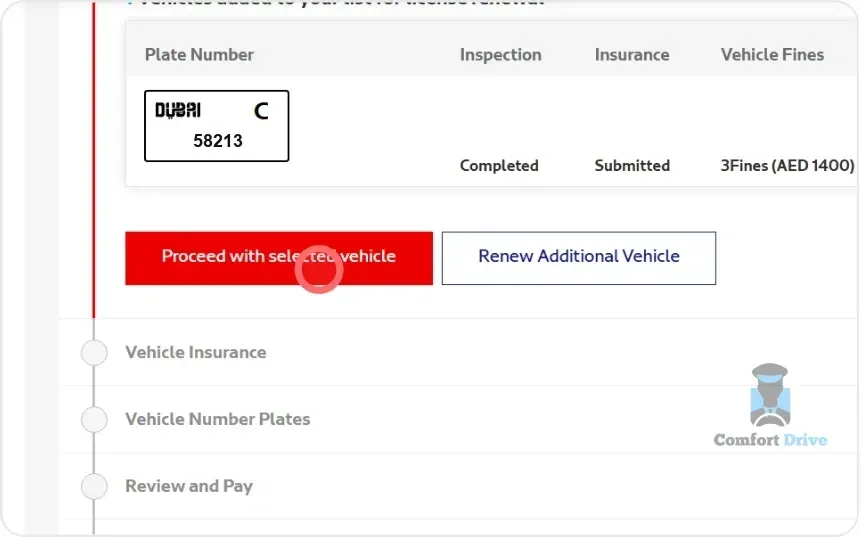
Step 7: Check the Status Columns
The plate confirmation screen is what decides whether your car renewal goes through. The table shows your plate alongside its inspection status, insurance status and any outstanding fines. All three have to be clear.
If the inspection column is the one holding you up, that is a trip to the testing centre, not a form problem, and you can stop here, sort it, and come back to this exact screen. Our car testing pickup and return service collects the car from your home or office, takes it through the test, and brings it back with the certificate filed against your plate, from AED 100. Everything from Step 8 down is then all that is left.
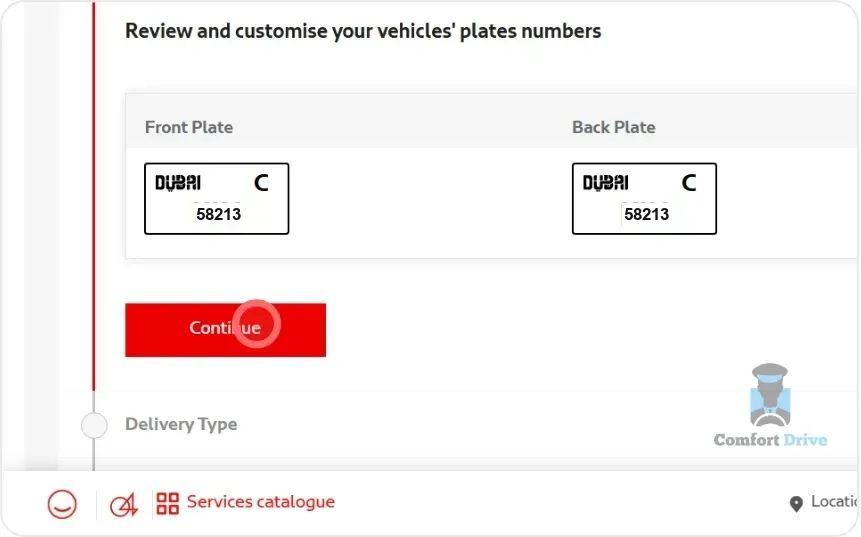
Step 8: Confirm the Plate Numbers
Review the front and back plate numbers, then click Continue.
Choose How Your Registration Card Is Delivered
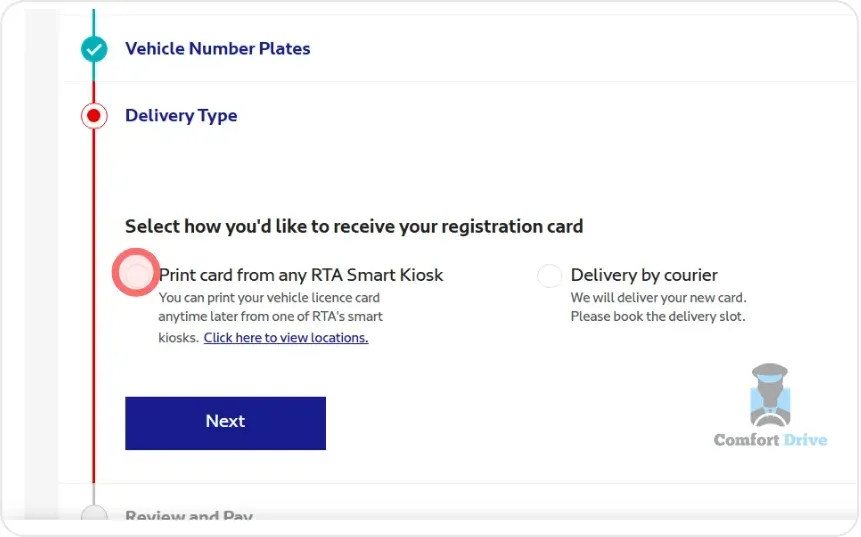
Step 9: Pick How You Want the Card
Print it yourself from any RTA Smart Kiosk, or have it couriered for an extra fee. RTA can also send the certificate by SMS or email, and the RTA Dubai app adds it to Apple Wallet. Confirm your choice, then read through the remaining terms and conditions and click Next.
Pay the Renewal on dubaipay
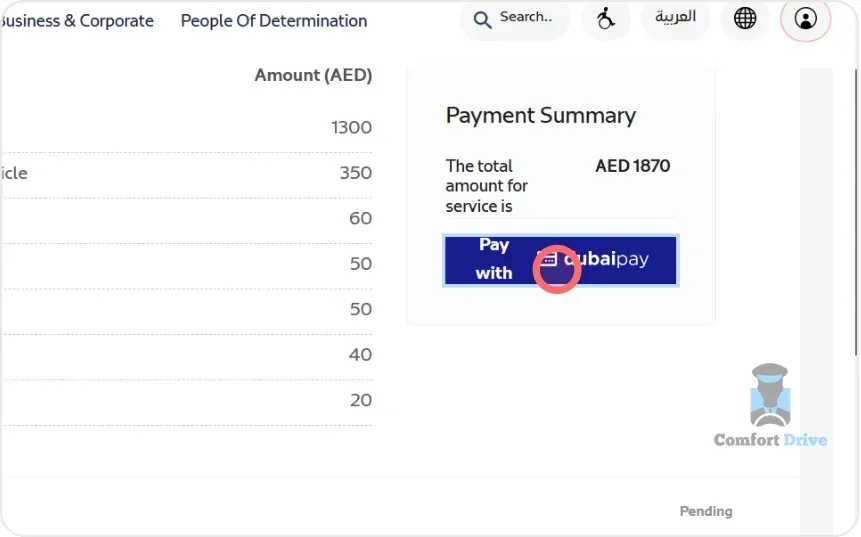
Step 10: Review the Payment Summary
The summary adds up the renewal fees and anything outstanding on the vehicle. Click Pay with dubaipay to move to the payment gateway. For a full breakdown of what each line item is, see our guide to registering or renewing your Mulkiya.
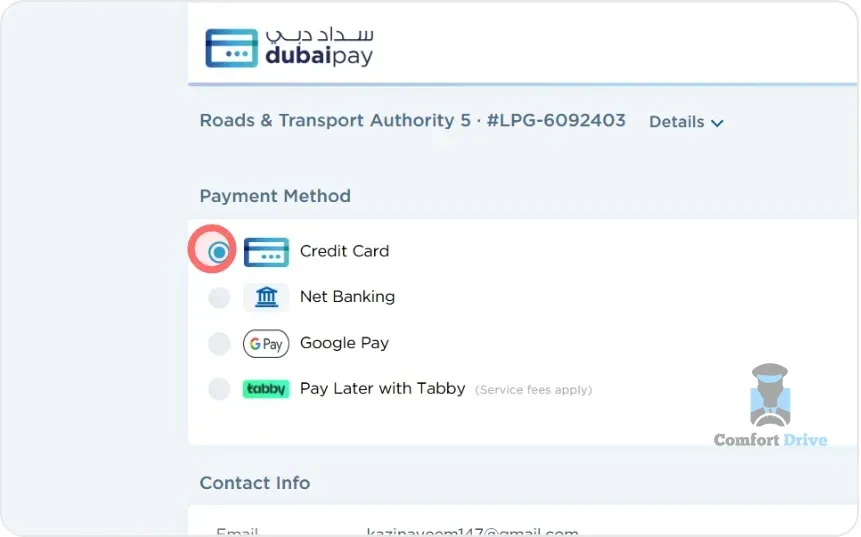
Step 11: Choose a Payment Method
dubaipay accepts Credit Card, Net Banking, Google Pay, and Pay Later with Tabby if you would rather split the cost. Enter your card details on the form that follows.
Download Your New Registration Card
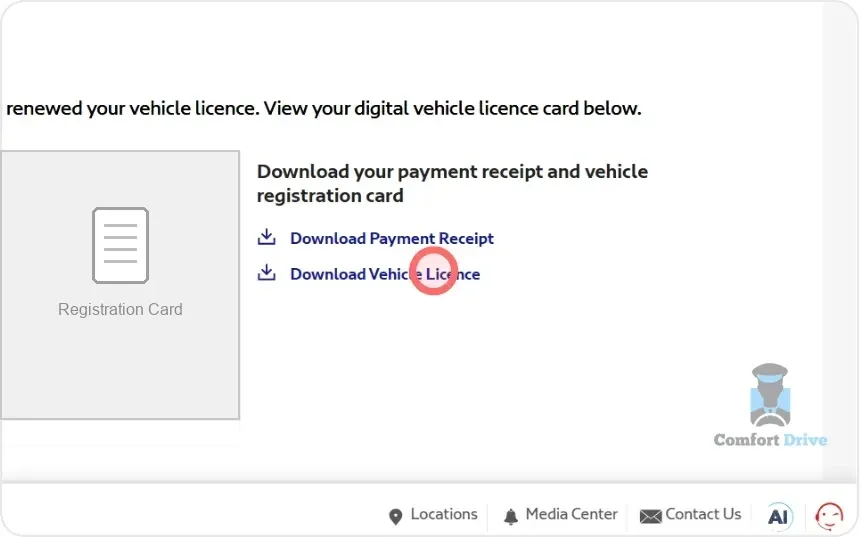
Step 12: Save the Receipt and the Card
The renewal is done. Download the payment receipt and your digital vehicle registration card from the confirmation screen before you close the tab. The digital card is valid on its own, so you are legal to drive from this point whether or not you collect the printed one.
The Part of Car Renewal That Actually Costs You Time
Twelve screens, about five minutes. The inspection is what takes the morning: the drive out to the centre, the queue, the wait, and the drive back.
That is the part we take off your hands. A licensed Comfort Drive driver does the run while you stay where you are, and everything above is all that is left.